There are many reasons why you mightmwant to add an image to a web page: youmight want to include a logo, photograph, illustration, diagram, or chart. so how we can add image ? .
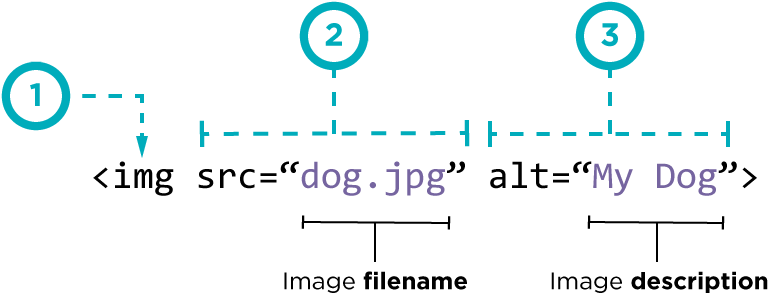
we use element ; that mean there is not close tage . and two attributes scr this to tell where the image find and alt to give description of the image if you cannot see it.
also we can use title attribute to provide additional information for the image .
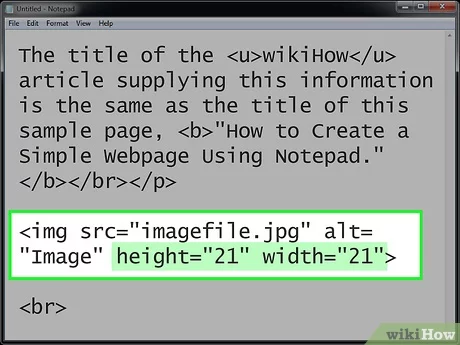
heIght & WIdth of Images . we can change The size of images using height and width attributes
three rules for CreatIng Images
saVe Images In the rIght format
saVe Images at the rIght sIze
use the CorreCt resolutIon
html5: fIgure and fIgure CaptIon
now we talk about element Images often come with captions. HTML5 has introduced a new element to contain images and their caption so that the two are associated. You can have more than one image inside the element as long as they all share the same caption.
he <figcaption> element has been added to HTML5 in order to allow web page authors to add a caption to an image. Before these elements were created there was no way to associate an element with its caption.
Color
three ways to specify color in css:
rgb values
hex Codes
Color names
Every color on a computer screen is created by mixing amounts of red, green, and blue. so RGB Values Values for red, green, and blue are expressed as numbers between 0 and 255.and Hex Codes Hex values represent values for red, green, and blue in hexadecimal code , but ColoR Names are represented by predefined names. However, they are very limited in number
Contrast : When picking foreground and background colors, it is important to ensure that there is enough contrast for the text to be legible.
opacity, rgba :
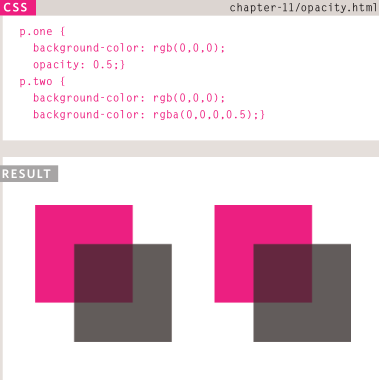
CSS3 introduces the opacity property which allows you to specify the opacity of an element and any of its child elements. the value is a number between 0.0 and 1.0 (so a value of 0.5 is 50% opacity and 0.15 is 15% opacity).
The CSS3 rgba property allows you to specify a color, just like you would with an RGB value, but adds a fourth value to indicate opacity. This value is known as an alpha value and is a number between 0.0 and 1.0 .
Css3: hsl Colors
CSS3 introduces an entirely new and intuitive way to specify colors using hue, saturation,and lightness values.
Hue is the colloquial idea of color. In HSL colors, hue is often represented as a color circlewhere the angle represents the color, although it may also beshown as a slider with values from 0 to 360.
Saturation is the amount of gray in a color. Saturation is represented as a percentage. 100% is full saturation and 0% is a shade of gray.
Lightness is the amount of white (lightness) or black(darkness) in a color. Lightness is represented as a percentage. 0% lightness is black, 100% lightness is white, and 50% lightness is normal. Lightness is sometimes referred to as luminosity.
text
typeface Terminology
Serif
SanS-Serif
monoSpace
Weight
Style
Stretch
Specifying TypefaceS _font-family
Size of Type _font-size . There are several ways to specify the size of a font. The most common are:
pixelS
percenTageS
emS
there are more font choice as @font-face allows you to use a font, even if it is not installed on the computer of the person browsing, by allowing you to specify a path to a copy of the font, which will be downloaded if it is not on the user’s machine . bold font-weight The font-weight property allows you to create bold text. there are two values that this property commonly takes:normal , bold . and italic font-style (italic,normal,oblique). uppercaSe || loWercaSe || capitalize text-transform . text-decoration and it’s value none underline overline line-through and blink .leading line-height
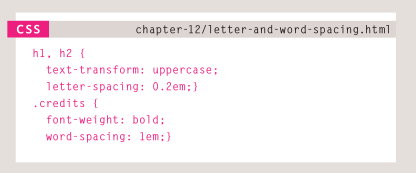
letter-spacing, word-spacing
alignmenT may be left , right,center ,justify .verTical alignment The vertical-align property is a common source of confusion. It is not intended to allow you to vertically align text in the middle of block level elements such as <p> and <div> , although it does have this effect when used with table cells (the <td> and <th> elements). It is more commonly used with inline elements such as , , or elements. When used with these element
h1{text-align:left;}
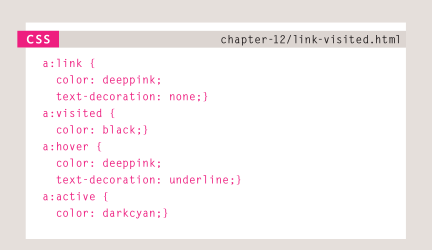
text-indent , text-shadow The value of this property is quite complicated because it can take three lengths and a color for the drop shadow.:first-letter, :first-line Technically these are not properties. They are known as pseudo-elements.STyling linkS :link, :visited reSponding To uSerS :hover, :active, :focus