HTML Lists, Control Flow with JS, and the CSS Box Model
lists :
there are three types of lists in html :
- Ordered lists . here we use <ol> and <li>.
- Unordered lists . using <ul> and <li>
- Definition lists . here we are using , <dt> , and <dd> .
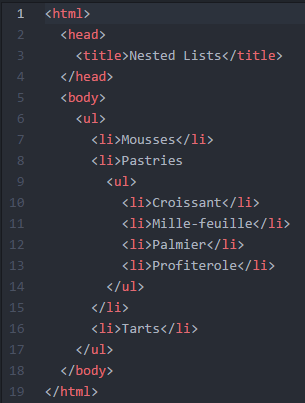
also we can add other list inside li so it called as nested list
chapter 13 boxes
The CSS box model is essentially a box that wraps around every HTML element. It consists of: margins, borders, padding, and the actual content. The image below illustrates the box model:
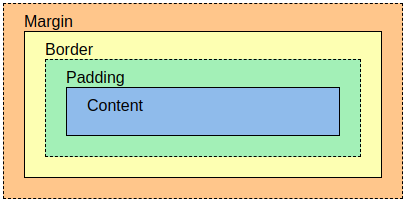
You can use CSS to control the dimensions of a box.
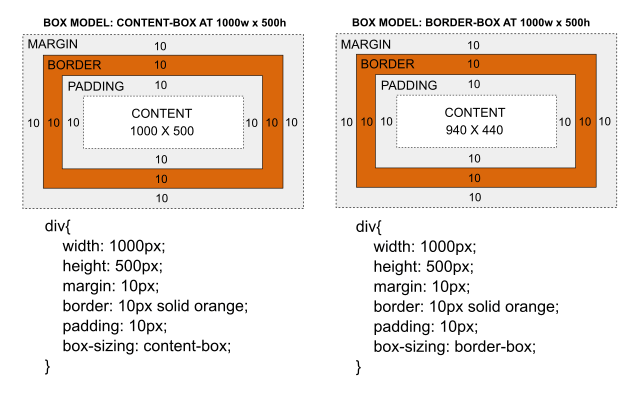
you can adjust the box using three variables border ,margin padding.
Box Dimensions __ width, height
and there are limiting WiDth min-width (specifies the smallest size a box can be displayed at when the browser window is narrow), max-width (indicates the maximum width a box can stretch to when the browserwindow is wide) and limiting height
Basic JavaScript Instructions
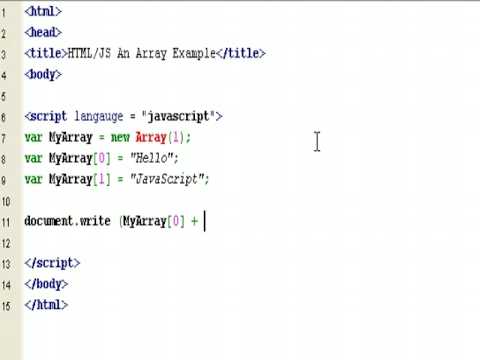
arrays : An array is a special type of variable. It doesn’t just store one value; it stores a list of values . Arrays are especially helpful when you do not know how many items a list will contain because, when you create the array, you do not need to specify how many values it will hold .
creating new array :
be sure you can access the array and change any value in it but you should be carful about the index for the value which you need .